
Discover how to integrate MQTT, Large Language Models (LLMs), and Retrieval-Augmented Generation (RAG) using Tactigon Shape, a visual no-code programming environment for Industrial IoT applications.
In this practical example, we will build an AI-powered industrial diagnostic workflow that automatically detects sensor errors, retrieves troubleshooting information from technical datasheets, and publishes structured diagnostic responses through MQTT.
By combining MQTT communication, LLM-based reasoning, and RAG-powered document retrieval, Tactigon Shape makes it possible to automate sensor troubleshooting and simplify industrial IoT integration without writing traditional code.
Our goal is to automatically identify a sensor error, retrieve the corresponding troubleshooting information from its datasheet, and publish a structured diagnostic response to an MQTT topic.
The workflow integrates the following components:
- Shape: Visual programming environment used to define the integration logic.
- MQTT: Messaging protocol used to receive error notifications and publish diagnostic results.
- ChordLLM: LLM service used to process queries and generate responses based on uploaded documents.
- RAG (Retrieval-Augmented Generation): Mechanism used to retrieve relevant information from the sensor datasheet and provide context to the LLM.
This example is organized into three main sections:
- Setup: Uploads the sensor datasheet to ChordLLM and initializes the RAG engine.
- MQTT Callback: Listens for incoming error notifications and extracts the error code.
- Loop: Sends the error code to ChordLLM, parses the response as JSON, and publishes the diagnostic information to MQTT.
1. Setting Up the RAG Engine with Sensor Datasheets #
The Setup section is executed once, before the main loop starts, following a programming model similar to the setup() function in Arduino. Its purpose is to initialize the knowledge base required for error diagnosis and ensure that ChordLLM is ready to process requests.
1.1 Uploading Technical Datasheets to ChordLLM #
The example uses a PDF file named example_sensor_manual.pdf, containing a sample sensor datasheet. The document describes possible error codes, their meanings, and the recommended troubleshooting actions for each error.
By using the Upload file to chat documents block, we can upload the PDF to the ChordLLM service, making the document available for subsequent queries.
1.2 Initializing the RAG Engine for Document Retrieval #
After uploading the document, the Execute RAG block instructs ChordLLM to process the chat documents and prepare the information required for retrieval-augmented generation. The workflow then waits until the RAG engine reaches the IDLE state, checking its status periodically. Once initialization is complete, the Debug block prints the message: READY!
At this point, the system is ready to process incoming sensor error notifications.
2.Receiving Sensor Error Notifications via MQTT #
The MQTT callback listens for incoming messages on the following topic: factory/line/sensors/errors
When a message arrives, the callback receives its content in the payload variable. The example expects the payload to be a dictionary containing an errorCode field. For instance, the following message indicates that the sensor has reported error E02:
Incoming MQTT message — QoS 1
{
  "errorCode": "E02"
}
The callback extracts the value of errorCode from the payload and stores it in the recv_error variable. In this example, recv_error is set to E02. The main loop can then use this variable to initiate the diagnostic workflow.
3. Automating Sensor Diagnostics with an LLM #
The Loop section continuously checks whether a new error code has been received. When recv_error contains an error code, the workflow performs the following operations.
3.1 Detecting and Processing Incoming Sensor Errors #
The loop checks whether recv_error is different from an empty value. If an error code is available, the workflow continues with the diagnostic request.
A Debug block prints a message containing the current error code, making it easier to monitor the execution of the workflow.
3.2 Sending Error Codes to the LLM for Diagnosis #
The example constructs a prompt using the Create text block and sends it to ChordLLM through the Send message block. The prompt instructs the LLM to return the information in JSON format:
Answer in json format. Gather informations about error code {recv_error}
Here, {recv_error} represents the value of the variable containing the error code received through MQTT. For example, if the received error code is E02, the resulting query becomes:
Answer in json format. Gather informations about error code E02
ChordLLM uses the previously initialized RAG engine to retrieve the relevant information from the sensor datasheet and generate a response describing the error and the recommended troubleshooting actions.
3.3 Converting AI Diagnostic Responses into JSON #
The response received from ChordLLM is processed by the Parse response into JSON block. This operation converts the generated response into a structured JSON object that can be used by subsequent blocks. The resulting object contains the error code, its meaning, the suggested checks, and any additional safety instructions available in the source document.
A Debug block can be used to inspect the generated response during development.
3.4 Publishing Diagnostic Results to an MQTT Topic #
Finally, the Publish payload block sends the JSON diagnostic response to the following MQTT topic: factory/line/sensors/checks
The message contains the troubleshooting information associated with the received error code. After publishing the response, the workflow resets recv_error to an empty value, allowing the loop to wait for the next error notification.
4. Example Execution: AI-Powered Diagnosis of Sensor Error E02 #
The following example illustrates the complete workflow when the sensor reports error E02.
4.1 Incoming error notification #
A sensor or another component of the production line publishes the following message:
Topic: factory/line/sensors/errors
QoS: 1
{
  "errorCode": "E02"
}
The MQTT callback extracts E02 and stores it in recv_error.
4.2 ChordLLM diagnosis #
The main loop detects the new error code and sends a query to ChordLLM. Using the sensor datasheet uploaded during Setup, ChordLLM retrieves the relevant information and generates a structured diagnostic response.
For this example, E02 represents an insufficient battery charge.
4.3 Outgoing diagnostic message #
The response is parsed into JSON and published to the output topic:
Topic: factory/line/sensors/checks
QoS: 0
{
  "error_code": "E02",
  "meaning": "The remaining battery charge is insufficient to ensure normal device operation. Some functions may be limited or interrupted.",
  "suggested_checks": [
    "Connect the device to the charger or power supply recommended by the manufacturer.",
    "Check that the cable, power supply, and electrical outlet are properly connected and working.",
    "Wait for the charging time specified in the manual and check whether the charging indicator changes state.",
    "If the battery is replaceable, use only a compatible model and follow the recommended replacement procedure."
  ],
  "if_problem_persists": "If the battery does not recharge, overheats, appears swollen, or shows signs of damage, stop using the device and contact technical support. Do not attempt to open or repair a damaged battery."
}
The response provides actionable troubleshooting information in a machine-readable format, allowing other applications or production-line components to consume and process the diagnostic result.
5. Building an Industrial IoT Diagnostic Workflow #
The example demonstrates how Shape can combine event-driven communication, document retrieval, and LLM-based reasoning in a single visual workflow.
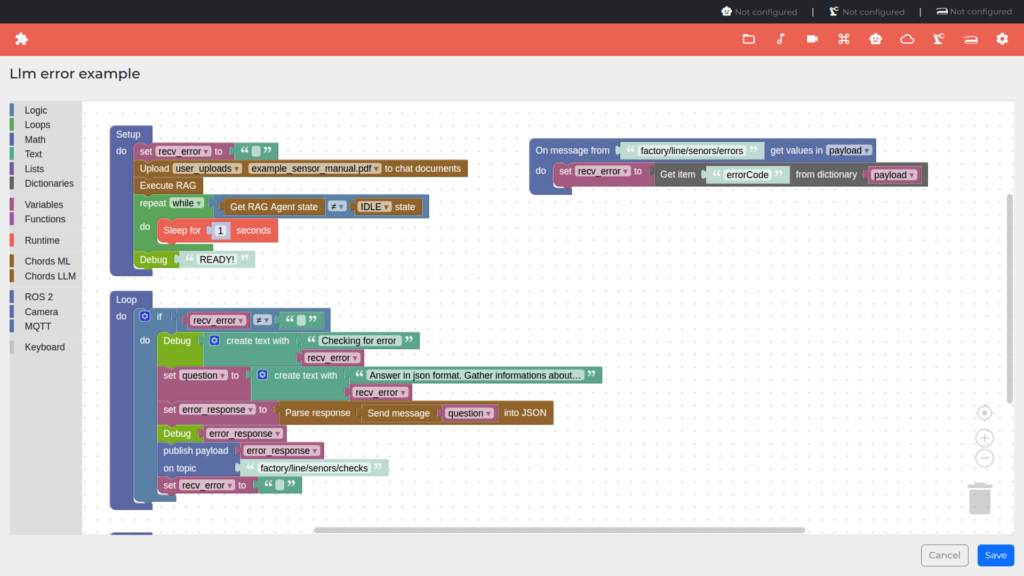
The complete execution sequence is:
- Initialize: Upload the sensor datasheet to ChordLLM.
- Prepare the knowledge base: Execute RAG and wait for initialization to complete.
- Receive an error: Listen for messages on
factory/line/sensors/errors. - Extract the error code: Read the
errorCodefield from the MQTT payload. - Request a diagnosis: Send a prompt containing the error code to ChordLLM.
- Structure the result: Parse the LLM response into JSON.
- Publish the diagnosis: Send the structured response to
factory/line/sensors/checks. - Reset the state: Clear the received error variable and wait for the next notification.
By combining visual programming, MQTT messaging, and RAG-powered LLM capabilities, this example shows how Shape can be used to build flexible integration workflows for industrial applications without requiring conventional script development.
The same approach can be extended to other devices, technical manuals, error-handling procedures, and production-line services simply by changing the source documents, MQTT topics, and query logic.


